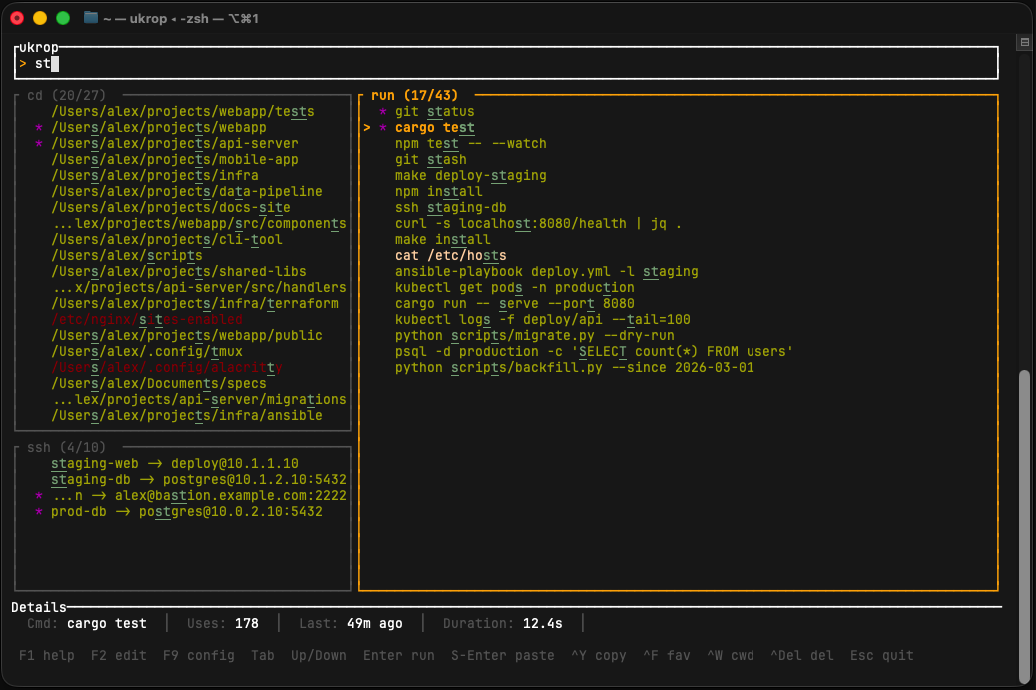
Most shell productivity tools specialize in either directory jumping or command history. ukrop handles both — plus SSH — in one unified TUI.
▦
Three-panel TUI
See cd, run, and ssh results side-by-side with a shared fuzzy search bar. No mode-switching.
⚡
Two-tier search
Substring matches rank above fuzzy-only ones. Characters are highlighted in cyan so you see exactly why something matched.
⏱
Frecency scoring
Exponential decay with a 1-week half-life. Recent and frequent entries surface first — transparent, no black boxes.
⌨
Shell integration
zsh, bash, fish, and PowerShell. Precmd/preexec hooks capture your directories and commands automatically. Ctrl+R opens the TUI.
⌘
SSH picker
Pulls hosts from ~/.ssh/config and your shell history. The only tool in its class that does this.
🎨
Themes & live config
12 color presets (Nord, Dracula, Gruvbox, Catppuccin, Tokyo Night…). Press F9 to edit config with live preview.
★
Favorites & CWD filter
Pin what you use most. Toggle to show only commands run in the current directory.
🔒
Local first
SQLite on disk, no account, no cloud, no daemon. Your data doesn't leave your machine.
⌁
Setup wizard
ukrop setup imports your shell history, installs the hook, and wires up the u alias. One command.
Quick start
brew install ukroporg/tap/ukrop    # install
ukrop setup                      # import history, install hook, alias u=ukrop
# restart your shell, then:
u                                # jump to a directory
u run                            # re-run a command
u ssh                            # connect to a host
u search docker                  # open with "docker" pre-filled
# Ctrl+R opens the TUI with the run panel active
curl -L https://github.com/ukroporg/ukrop/releases/latest/download/ukrop.deb -o ukrop.deb
sudo dpkg -i ukrop.deb           # install
ukrop setup                      # import history, install hook, alias u=ukrop
# restart your shell, then:
u                                # jump to a directory
u run                            # re-run a command
u ssh                            # connect to a host
u search docker                  # open with "docker" pre-filled
# Ctrl+R opens the TUI with the run panel active
cargo install --git https://github.com/ukroporg/ukrop    # install
ukrop setup                      # import history, install hook, alias u=ukrop
# restart your shell, then:
u                                # jump to a directory
u run                            # re-run a command
u ssh                            # connect to a host
u search docker                  # open with "docker" pre-filled
# Ctrl+R opens the TUI with the run panel active