Three-panel TUI
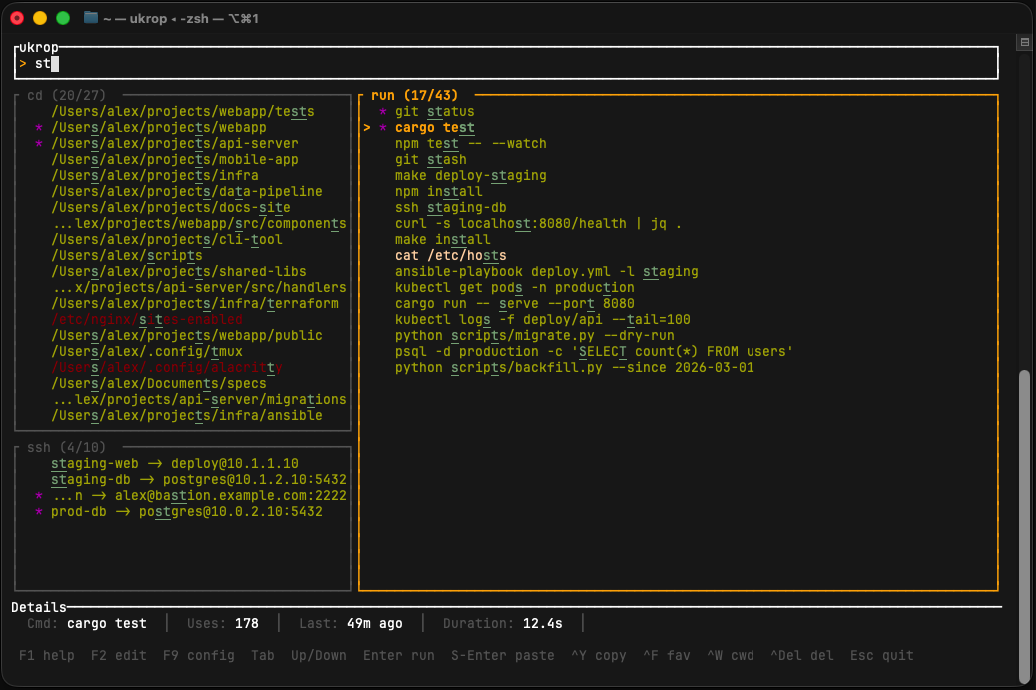
Instead of bouncing between different tools for cd, Ctrl+R, and SSH, ukrop shows all three categories at once. A single search bar filters them in parallel — you see your matching directories, commands and hosts on the same screen.
- Left column (default 25% width): cd on top (75% height), ssh on the bottom
- Right column (default 75% width): run panel, full height
- Active panel has a bright green border; the others are dimmed
- Tab cycles the active panel; layout ratios are configurable
Two-tier search with highlighting
ukrop's matcher checks each item for a substring hit first. If found, the item gets an 8,000-point bonus. If not, it still competes via the fuzzy matcher (powered by nucleo), so rough matches still appear — just below exact ones.
Matched characters are highlighted in cyan with an underline, so you can see exactly why something matched. If your query contains a space, it switches to literal substring mode: the whole query, spaces and all, must appear as-is.
Read the full scoring formula →
Frecency scoring
Entries are ranked with a transparent frequency × recency formula. Each use adds 1.0 to the score, and the score decays exponentially with a one-week half-life:
- Used once today: score ≈ 1.0
- One week later: ≈ 0.5
- Two weeks later: ≈ 0.25
- Used 10 times today: ≈ 10.0
When totals get too large, all scores are scaled down and near-zero entries are pruned. No neural network, no surprises.
Shell integration
One eval line installs:
- A precmd/prompt hook that records
$PWDon every prompt - A preexec hook that captures each command, its exit code, working directory, and duration
- A shell wrapper function that turns ukrop's stdout into an actual
cd/ command /ssh - A Ctrl+R binding that opens the TUI with the run panel active
- An alias
u=ukropfor quick access
Supported shells: zsh, bash, fish, PowerShell.
SSH host picker
ukrop parses ~/.ssh/config and records every ssh hostname command your shell runs. The ssh panel lets you fuzzy-search across both sources — picking a host invokes ssh with the host's canonical name. This is unique to ukrop: no other tool in its class bundles SSH picking.
CWD-scoped commands
Every recorded command includes the directory it was run in. With one keypress you can filter the run panel to show only commands you've previously run in the current working directory, so your project-specific build, test, and deploy commands surface first. Commands run in the current CWD also get a 4,000-point ranking bonus when the filter is off.
Favorites
Hit Ctrl+F on any entry to pin it. Favorites float to the top of their panel even with an empty query, marked with a ★. Works for directories, commands, and SSH hosts.
Edit before execute
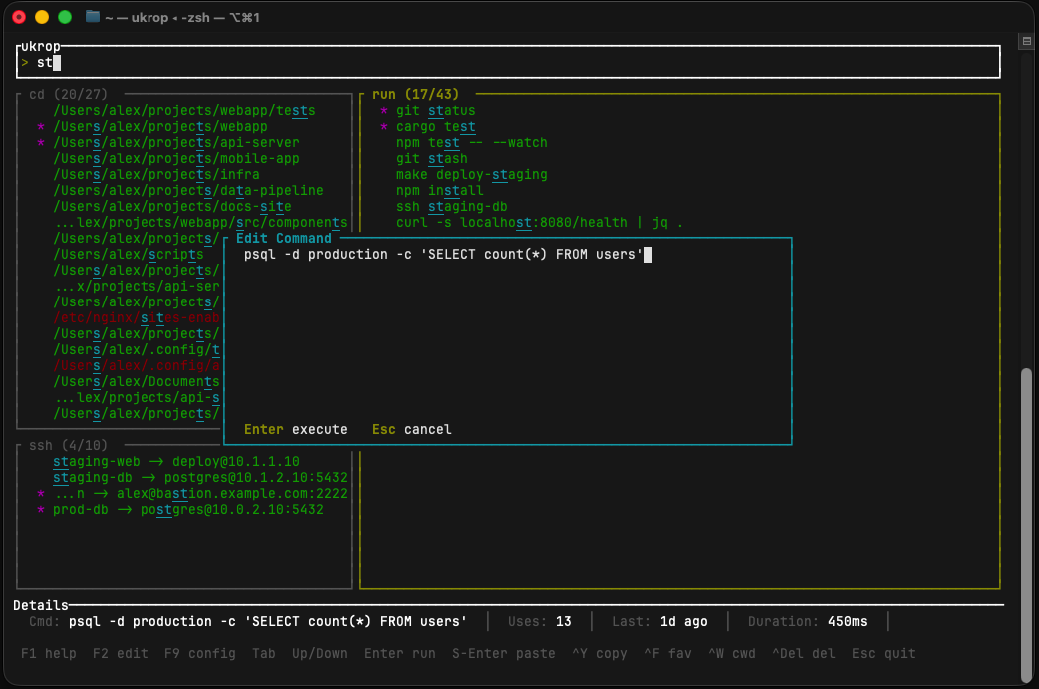
F2 opens an in-TUI editor dialog pre-filled with the selected command — edit it right there (multi-line editing with Enter for newlines, arrow keys to navigate) and press F5 to execute. Shift+Enter or F5 from the main view pastes the command into the terminal prompt for editing in your shell. Both are handy for reusing a docker run line with a new flag, or tweaking a curl before firing it.
Copy to clipboard
Ctrl+Y copies the currently selected entry without executing it — useful when you want to paste a directory path into another tool, or grab a command for a script.
Themes & in-TUI config editor
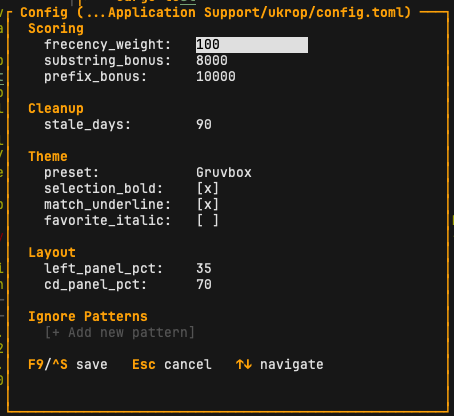
Press F9 (or run ukrop config) to open a modal config editor with live preview — changes to theme and layout update the background panels in real time. Esc reverts; F9 or Ctrl+S saves.
Twelve built-in themes: default, light, nord, solarized, monochrome, dracula, gruvbox, catppuccin, tokyo_night, kanagawa, everforest, rose.
See the configuration reference →
Import, export, demo data
ukrop export --file backup.jsonl   # back up entire database
ukrop export                       # export to stdout (pipe-friendly)
ukrop import --file backup.jsonl   # restore (replaces current data)
ukrop demo                         # generate realistic sample data
The JSONL format is one JSON object per line with a type field — trivial to diff, grep, or edit by hand.
Non-interactive mode
When stdout isn't a TTY, ukrop cd <query> just prints the best match. Useful in scripts:
cd "$(ukrop cd projects)"Auto-cleanup
When you open the cd panel, directories that no longer exist on disk and haven't been visited in stale_days days (default 90, configurable) with a low score are automatically removed.
Privacy & ignore patterns
Everything is local — a SQLite database at ~/Library/Application Support/ukrop/ukrop.db (macOS) or ~/.local/share/ukrop/ukrop.db (Linux). No network, no telemetry, no account.
You can tell ukrop to never record commands matching certain patterns, including the classic HISTCONTROL=ignorespace trick (anything starting with a space):
ignore_patterns = [
  " ",      # leading-space commands
  "ls",     # exact match
  "cd *",   # any cd command
  "exit",
]