Complete example
# ~/.config/ukrop/config.toml

# Commands matching these patterns are never recorded
ignore_patterns = [
    " ",       # commands starting with a space (HISTCONTROL=ignorespace)
    "ls",      # exact match
    "cd *",    # prefix + wildcard — any cd command
    "exit",
]

[scoring]
frecency_weight = 100.0   # scale factor for frecency bonus
substring_bonus = 8000    # bonus for substring matches
prefix_bonus    = 10000   # bonus for prefix matches

[cleanup]
stale_days = 90           # auto-remove missing dirs older than this

confirm_delete = true     # ask before deleting entries (default: true)

[theme]
preset          = "default"   # see list below
selection_bold  = true
match_underline = true
favorite_italic = false

[layout]
left_panel_pct = 25       # left column width (5–50)
cd_panel_pct   = 75       # cd panel height within left column (10–90)
ukrop config) to open a modal editor. Theme and layout changes update the background panels in real time. Esc reverts; F9 or Ctrl+S saves.
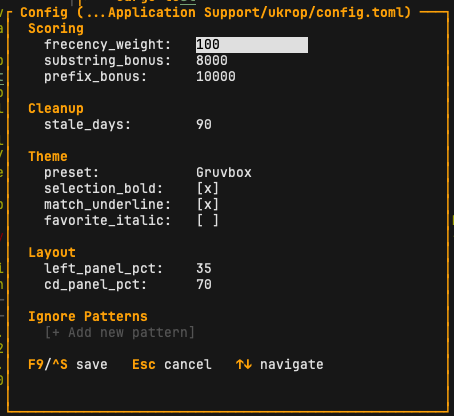
Scoring
| Key | Default | What it does |
|---|---|---|
frecency_weight | 100.0 | Multiplier applied to each item's frecency score. Capped at a 5,000-point bonus so very-frequent items can't drown out better matches. |
substring_bonus | 8000 | Added when the query appears as a contiguous substring. Guarantees substring matches rank above fuzzy-only matches. |
prefix_bonus | 10000 | Added when the item text starts with the query. Guarantees prefix matches rank first. |
See Search & Ranking for the full scoring formula.
Cleanup
stale_days (default 90) — directories that no longer exist on disk and haven't been visited in this many days (with a low score) are removed automatically when the cd panel opens.
Behavior
confirm_delete (default true) — when enabled, pressing F8 / Ctrl+Del asks for confirmation before removing an entry. Set to false to delete immediately.
Ignore patterns
Three types are supported:
"ls"— exact match only"cd *"— prefix + wildcard; matches any command starting withcd" "— matches any command starting with a space (the classic "don't record this" convention)
Theme presets
default
Yellow borders, cyan highlights, green/white age colors.
light
Blue borders, magenta highlights — for light terminals.
nord
Cool blue/cyan tones from the Nord palette.
solarized
Solarized dark.
monochrome
White and grey only, no colors.
dracula
Purple borders, green highlights, pink headers.
gruvbox
Warm yellow, aqua and green tones.
catppuccin
Mocha mauve / green pastel palette.
tokyo_night
Cool blue borders, yellow highlights.
kanagawa
Crystal blue, autumn yellow, sakura pink.
everforest
Soft green / yellow natural tones.
rose
Rose Pine — love pink + iris purple.
Theme styling toggles
| Key | Default | Effect |
|---|---|---|
selection_bold | true | Bold style for the currently selected item |
match_underline | true | Underline matched characters in results |
favorite_italic | false | Italic style for favorited entries |
Layout
| Key | Range | Default |
|---|---|---|
left_panel_pct | 5–50 | 25 — width of the left column (cd + ssh) |
cd_panel_pct | 10–90 | 75 — height of the cd panel inside the left column |
Environment variables
| Variable | Purpose |
|---|---|
UKROP_CONFIG_PATH | Override the path to config.toml. |
UKROP_DB_PATH | Override the SQLite database location. Useful for tests and sandboxing. |
Database location
- macOS:
~/Library/Application Support/ukrop/ukrop.db - Linux:
~/.local/share/ukrop/ukrop.db
SQLite with WAL mode. Back it up with ukrop export --file backup.jsonl.